Peter in his bookmarks points to a description of Bookfeed.io by Swiss blogger Lukas Mathis. Bookfeed.io lets you make a list of authors you are interested in, and then provides you with a RSS feed that will alert you to new books published by those authors. It uses the Google Books API. It’s a clever small personal tool that Lukas Mathis built. I like it. I’ve added a handful of authors from the top of my head, and subscribed to the resulting RSS feed. I also added a monthly reminder to my task list to add or remove authors from the list.
Open State Glass en Black Box Awards
De Open State Foundation en SETUP lanceren de SOS Tech Awards gericht op transparantie en verantwoordelijkheid in de digitale samenleving.
De Glass & Black Box Awards gaan over openheid en transparantie. De Dode & Levende Mussen Award gaan over verantwoordelijkheid nemen na technologische missers, en de mate waarin bedrijven en overheden niet alleen excuus aanbieden maar ook echt hun handelen aanpassen. De genomineerden worden in de komende weken bekend gemaakt. De SOS Tech Awards worden op dinsdag 23 maart 2021 uitgereikt via een livestream vanuit de centrale Bibliotheek Utrecht.
(In het kader van transparantie: ik ben bestuurslid bij de Open State Foundation)
Personal CRM as a Not-LinkedIn
Lukas Rosenstock posted a write-up of a group discussing their personal CRM routines he organised. A little over a year ago I was impressed with how Rick Klau (an old blogging connection) described his ‘homebrew CRM‘.
Lukas mentioned there were three groups in his conversation, one using specialised tools, one group using no digital tools, and one group using more general tools (“like Roam, Notion or Airtable“). I’m definitely one of the latter.
After reading Rick’s posting a year ago I parked it for a while, but when I adopted Obsidian for note taking, after a while I also started using it for some light weight CRM notes. Unlike Rick I haven’t added any process or automation, but I did start creating CRM notes so that something like it might become possible over time.
What I started with is making notes about people I encounter.
LinkedIn has one glaring hole in its functionality and that is allowing me to add something about the context of when I met someone. After using LinkedIn for 16 years I now sometimes come across a LinkedIn contact and then don’t remember how or why we connected. LinkedIn by now does show when you connected, allowing me to browse through someone’s CV to see what that person did when we connected and try to remember the context of that connection. Xing, mostly used in German speaking countries, had this from the start including a field for a few notes on when / how you met someone. That has proved valuable. [UPDATE In the comments Aad points out such a feature has been present at some point. Online search suggests it was introduced in 2013/4 with LinkedIn Contacts, and became a premium-only feature from 2017. By 2013 I had some 2k contacts, 10 years worth of interaction, where such contextual info was missing, and I use the free version, so the general point stands, even if factually not correct since 2013]
Back when I used a wiki on my laptop for notes, I also kept CRM style notes in it, especially 2004-2008. The useful bit was that I could link to a person’s page in the various notes I made about meetings, events etc. That ‘backlinking’ overview in itself was a great way of adding contextual info.
With Obsidian and the use of simple text files in markdown I have that back, and actually in a better way than in that wiki of old. Because those text files can be approached by a wide variety of software tools, not just Obsidian.
I’m not attempting to be complete in these CRM notes, I grow them the same way as I grow the other type of notes: when I encounter someone new I make note of it. Especially when I don’t know someone yet, or don’t have a strong connection to someone I make those notes. Not so much of people that I’m already connected to like colleagues. I’ve started a few new projects in the past few months, which is always a moment when you encounter a lot of new people in a new context. So those I’ve made notes for, as it helps understand a new client organisation, relevant stakeholders and context. For now backlinking in meeting and project notes is the way for adding a record of interaction.
Maybe in a year or so I can start doing more pro-active things with those notes, like Rick has built into his routines. Another element to me is potentially leaving LinkedIn behind at some point in the future, or at least be somewhat prepared when LinkedIn goes away, as all these platforms do.
Do you have some personal CRM-type routines or automation?
 Handshakes and conversations is what I’m interested in, not marketing instruments. Image Handshake by Elisha Project, license CC BY SA
Revisiting My Ideal Feed Reader
Two years ago I wrote about the features I’d like to see in an ideal feed reader. Today I’ve tried to sketch out the various components, based on the various IndieWeb protocols, and then match the features I listed previously to the component that I think should provide it.
Separating feed reading into IndieWeb components
Feeds from blogs, to the left in the sketch below, end up in a microsub server, whose function is to fetch and store feeds. A microsub client is what presents those fetched feeds to me. A regular feed reader usually does both these things, but splitting them like the IndieWeb does allows multiple clients to use the same collection of feeds and feed items. It allows a wider diversity of readers, if the fetching is dealt with separately.
The microsub client also contains a micropub client. This allows having action buttons underneath each item presented in your microsub client. Hitting a button posts your reply or remarks, or shares something to your own website, and through your site to e.g. Twitter or Mastodon. Ideally it would be possible to have different websites to share to, next to storing locally in a specified format. The website that receives such an action has a micropub endpoint, and may need authentication through IndieAuth.
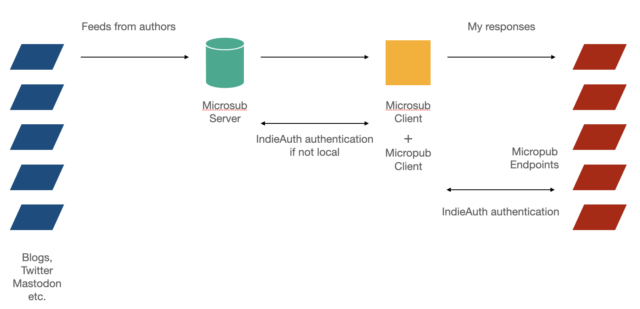
Such a reader set-up should be able to run locally on my laptop, as well as on a basic hosting package, so likely php / mysql based. Locally because I want to run my stuff local first, but the same thing online, even if a home server, because I’m not always working on my laptop and would like access from my tablet too, and point my Android Indigenous app to my subscriptions. Locally I would not need authentication from the microsub client to the microsub server, but in all other situations I would.
The sketch above is completely congruent with how I sketched my information gathering and filtering process in 2005:

Matching the ideal functionality to IndieWeb components
When I match the features of my ideal feed reader to those various IndieWeb components I think this is what results:
Microsub server needs to be able to :
* use various kinds of feeds (rss, atom, json, h-feed)
* allow folders (so I can arrange feeds on social distance)
* recognize and store tags if feed items have them
* allow me to tag _feeds_, really meaning tagging authors
* keep track of posting frequency, last post seen of feeds
* keep track of tags or predefined topics mentions/frequency
* pull in machine translations by default for certain feeds and store them with the orginal item
Microsub client needs to be able to:
* present the feed items in the server’s folder structure as a long list (the classic feed reader view)
* present views based on patterns in current feed items: what’s hot, what’s unique? Also set against social distance. (Topics discussed in my communities today)
* present views based on feed tags (show me all Germany based blog items of this morning, show me every feed of from EU based coders)
* present views based on feed tags and item tags: show me Germany based blog items talking about topic X.
* show full text search results of all items mentioning a certain topic.
* store full text search queries
* present visually which topics seem to be hot in which community, or where the frequency of mentioning a topic has changed
* provide a search of feeds (not feeds content): do I already have this feed in my list, where’s the feed of author Y?
* pull in a machine translation on request
Micropub client needs to be embedded in the microsub client and should support:
* saving an article as markdown or as html, to disk, to Zotero
* creating a todo from it by amending a textfile,
* bookmarking it, either to my blog or some other target
* sharing something about it to my blog, to Mastodon through my blog
* replying to it, through my blog to Mastodon, Twitter, other blogs
* allow configuring new actions.
* choosing from multiple micropub endpoints
What do you think, should some of these features be provided by other components than they’re currently listed? Are features missing that you’d like to see in your ideal feed reader?
Forcing DPA’s To Uphold GDPR
Two bookmarks, concerning GDPR enforcement. The GDPR is an EU law with global reach and as such ‘exports’ the current European approach to data protection as a key citizen right. National Data Protection Agencies (DPAs) are tasked with enforcing the GDPR against companies not complying with its rules. The potential fines for non-compliance are very steep, but much depends on DPAs being active. Various DPAs at this point, 2 years after GDPR enforcement commencing, seem understaffed, indecisive, or dragging their feet.
Now the DPAs are being sued by citizens to force them to do their job properly. The Luxembourg DPA is sued for the surprising ruling that the GDPR is basically unenforcable outside the EU (which isn’t true, as it could block services into the EU, seize assets etc.) And there’s a case before the EUCJ, based on the Irish DPA being extremely slow in starting investigations of the Big Tech companies registered within its jurisdiction, that would allow other national DPAs to start their own cases against these companies. (Normally the DPA of the country where a company is registered is responsible, but in certain cases DPA’s of the countries of residence of the complaining citizen can get involved too.)
The DPAs are the main factor in whether the GDPR is an actual force for data protection or an empty gesture. And it seems patience with DPAs to take up their defined role is running out with various EU citizens. Rightly so.
Cool Open Street Map Isochrone Maps
A few months ago I posted about being aware of what of your surroundings you could reach within 60 or 90 minutes by car or public transport. Towards the end of that posting I posted a map of my reach from home for 60 and 90 minutes. It was a bit of work to find a service that could make such isochrone maps for me.
Today Open Street Map volunteer Rory pointed to CommuteTimeMap which provides isochrone maps for any location in the world, based on Open Street Map. That’s very cool.
Of course I immediately compared CommuteTimeMap with the maps I had made before. What I used before didn’t allow for doing this for public transport (just walking and cars iirc), and CommuteTimeMap does. However the underlying data about public transport may be incomplete (just buses perhaps), as the map for 60 mins of public transport shows a very limited range, where the actual range is more or less the full size of the image (Zwolle, Amsterdam, Utrecht, Apeldoorn, Ede all within range). Or it simply isn’t set up for multimodal transport, and it assumes I’d take public transport from the bus stop nearest to me, where in reality I would cycle the 7 minutes it takes to the nearest railway station. Taking the bus to the railway station would cost significantly more time.
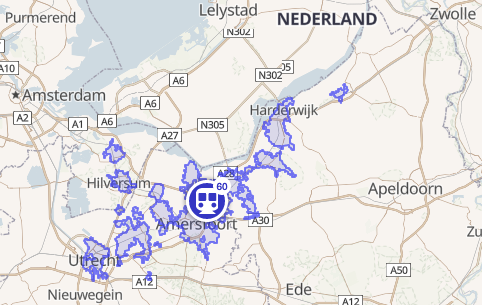
my 60 min public transport range, according to OSM, more pessimistic than in reality
On the other hand, the map for my reach by car in 60 minutes seems a little bit optimistic, covering most of what on my previously made map is shown for 90 minutes of driving. In general it provides a similar contour though, and a lot more detail (such as excluding car free national parks).
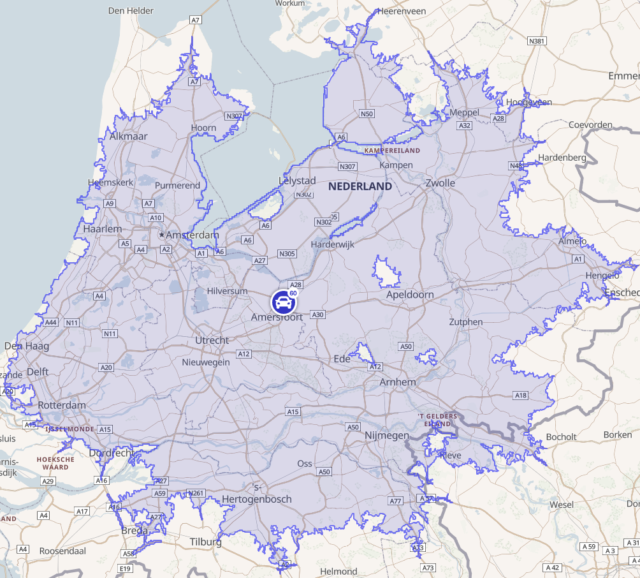
my 60 min driving range, according to OSM

my 60 and 90 min driving range, according to what I previously used
I’m definitely using this from now on.
 English