Ik nodig Nederlandstalige Obsidian.md gebruikers uit voor de eerste Nederlandstalige Obsidian Meet-up, zaterdag 24 april 20:00. De link voor de meet-up is https://meet.tgl.eu/EerstNederlandstaligeObsidianMeetup (mijn Jitsi-server).
Category: knowledge work
 subscribe to this category with rss
Link Journey Plugin for Obsidian
There is a new community built plugin available for Obsidian: Journey.
It’s a tool that figures out the connecting path between two notes. When you give it note A as starting point, and B as destination it will show the notes between that build a path from A to B. There are settings to exclude specific folders, backlinks, or not use #tags as connecting pivot, or ignore notes that have more than a certain number of links (your indexes, tables of content, outlines etc). It’s a useful way to let myself be surprised by connections through my notes and notions, to see how my thinking is linked. That is valuable when asking questions of my notes, and interacting with it to further my own thinking. It also has ‘I’m feeling lucky’ button that selects two notes at random to explore if a path exists between them.
Some discussion about the Journey plugin with feature descriptions and screenshots is in the Obsidian forum. To install it, you can find the plugin by searching Community plugins in Obsidian’s settings.
(found through Frank Meeuwsen‘s daily automated e-mail with the latest Obsidian discussions from the Obsidian Forum and the subreddits for Obsidian, Zettelkasten and notetaking.)
Connecting my PKM to Anki
Writing my Notions and notes these past months as part of my revamped personal knowledge management system, I realised as the collection grew that using the collection as a thinking tool also requires remembering more of what is in there. Not to make the notes superfluous but to have more top of mind material that serves as a starting point in interacting with the notes I have, as well as to be able to weave that more easily into current tasks and work. I also expect it to aid creativity, as a large chunk of creativity is recombination of previous elements, and remembering more elements lowers the threshold to new combinations.
Both in Andy Matuschaks notes and in this long article by Michael Nielsen about his use of Anki, spaced repetition is discussed in the context of note taking, and it got me thinking (I write ‘thinking’, but it was as much working through the mentioned material and distilling the concepts key to me from it, as it was chewing on it mentally and adding that to those same notes. Thinking is more interacting with my PKM, rather than sitting down looking into the middle distance as per Rodin’s bronze).
Anki is a tool (on laptop and mobile), that allows you to train your memory with flash cards and spaced repetition. I’ve used it in the past, e.g. to increase my vocabulary in French and to better read cyrillic script, but not with much energy or effect. It felt uncomfortable to be using card decks made by others for instance. Making my own flash cards from scratch always seemed a daunting task as well.
With my now much better set-up of notes however I have a great starting point to create my own decks of flash cards. As I am obviously not the first one to realise the potential of notes collections for flash cards, there is already an Obsidian plugin that pulls out questions and answers from my notes, and puts them into Anki. It comes with a wiki that documents how to set it up for yourself, including how to mark various types of questions and answers in your notes.
The key feature is, that I can add a question and its answer as a part of any note, and the plugin will pull it out and export that to Anki. It means I can e.g. end a note on three key aspects of distributed applications, with an Anki question and answer about those three aspects, which will get exported to Anki. Better still, I can add multiple questions in different forms about the same thing to that note, e.g. a follow-up question for each of the three aspects. Having multiple versions of basically the same question means I can phrase them for different memory hooks in parallel. This will enhance my own understanding, and allows me to place notions in specific contexts for instance.
I have now installed the Obsidian to Anki plugin in Obsidian, and the Anki Connect plugin in Anki (so it can ‘listen’ for automated input).
Some things I hope this will yield benefits for is:
- making it a more deliberate choice what I want to remember long term
- making it easier to remember the basics of a new field of interest
- making the effort to remember a habit
- improving my skilled reading
- using remembered material to better connect new notes to the existing corpus
- making it easier to internalise new / relatively new material
The way I’m approaching it is to have all my flash cards, whatever the topic, in the same single deck. This as I see my notes collection and all the stuff I remember as a interlinked network of topics and material. Splitting it up in some sort of thematic structure precludes a whole range of potential connections and associations, and is artificial in that it makes a current perhaps logical distinction the norm forever.
The coming 12 weeks or so I’ll work on two habits:
- adding questions to my notes as I work on those notes, and
- using Anki daily to review those questions.
100 Days in Obsidian Pt 6: Final Observations
Over the past few weeks I have described how my usage of Obsidian has evolved since I first used in early July. This is the final post in the series. Where the previous posts described my personal knowledge management system, and how I use it for daily project work, task management, note taking, and flow using workspaces in this final post I want to mention a few more general points.
These points concern first my overall attitude towards using Obsidian as a tool, second its current functionality and third its future development of functionality.
First, what is most important to me is that Obsidian is a capable viewer on my filesystem. It lets me work in plain text files. That is my ‘natural’ environment as I was used to doing everything in text files ever since I started using computers. It’s a return of sorts. What Obsidian as a viewer views is the top folder you point it to. The data I create in that folder remains independent from Obsidian. I can interact with that data (mark down text files) through other means than just Obsidian. And I do, I use the filesystem directly to see what are the most recent notes I made. I add images by downloading or copying them directly into a folder within the Obsidian vault. I use Applescript to create new notes and write content to them, without Obsidian playing any role.
Next is that Obsidian allows me to rearrange how I see notes in different workspaces and lets me save both workspaces and searches, which means it can represent different queries on my files. In short Obsidian at this moment satisfies 3 important conditions for decentralised software: I own my own data, the app is a view, interfaces are queries. Had any one of those 3 but especially the first been missing, I would be exchanging one silo (Evernote) for the next. Obsidian after all is not open source. A similar tool Foam is. Foam is currently not far enough along their path of development to my taste, but will get there, and I will certainly explore making the switch.
When it comes to current functionality I am ensuring that I use Obsidian only in the ways that fit with those three conditions. There is some functionality I therefore refuse to use, some I likely won’t use, and some I intend to start using.
I refuse to use any functionality that creates functionality lock-in, and makes me dependent on that particular feature while compromising the 3 key conditions mentioned above. Basically this covers any functionality that determines what my data looks like, and how it is created (naming conventions, automatic lay-outs etc). Functionality that doesn’t stick to being a viewer, but actively shapes the way data looks is a no go.
There are other functions I won’t use because they do not fit my system. For instance it is possible to publish your Obsidian vault publicly online (at publish.obsidian.md, here’s a random example), and some do. To me that is unthinkable: my notes are an extension of my thinking and a personal tool. They are part of my inner space. Publishing is a very different thing, meant for a different audience (you, not me), more product than internal process. At most I can imagine having separate public versions of internal notes, but really anything I publish in a public digital garden is an output of my internal digital garden. Obviously I’d want to publish those through my own site, not through an Obsidian controlled domain.
Other functionality I am interested in exploring to use. For instance Obsidian supports using Mermaid diagrams, a mark-down style language. This is a way to use diagrams that can port to another viewer as well, and doesn’t get in the way if a viewer does not support them.


Mermaid is a way to describe a diagram, and then render it. Seen here both from within Obsidian.
Future functionality I will explore is functionality that increases the capabilities of Obsidian as a viewer. Anything to more intelligently deal with search results for instance, or showing notes on a time line or some other aspect. Being able to store graph settings in a workspace (graphs now all revert to the default when reloading a workspace). And using the API that is forthcoming, which presumably means I can have my scripts talk directly to Obsidian as well as the filesystem.
I’ve now been using Obsidian for 122 days, and it will likely stay that way for some time.
In reply to by Thomas Vanderwal
Thank you for mentioning the James Burke and Connections in your week notes Thomas! And using it as a metaphor for your Obsidian usage. Some timely serendipity while working out some notes related to theories of change in my own Obsidian vault.
Btw, I’ve been documenting some of my Obsidian experiences in the past week or so, the first of which describes my pkm system, and how Obsidian supports parts of it.
I’m finding with what Obsidian offers I’m able to really get a lot of crosswalks between ideas, sources, authors / creators, and structures that I just didn’t have access to before. Already it feels a bit like I have a James Burke long transfer system in the works that is part of the structure of his Connections series.
Thomas Vanderwal
100 Days in Obsidian Pt 2: Hierarchy and Logs
In part 1 I explained how Obsidian is a tool I use in support of the methods I employ that make up my system to process incoming information as well as track and do my work.
I started using Obsidian to make better notes (Notions as I call them), and link them together where I see relevance. This is a networked type of use. For my daily work and for logging that daily activity I use a folder structure, which is a hierarchical approach. My personal knowledge management system is based on the interplay of those networked and hierarchical perspectives, which allows emergent insights and putting those insights to action or keep them until they can be used.
Folder hierarchy
To kick-off my more detailed description of using Obsidian, I will start with that hierarchical perspective: the folder structure. I will also explain how I make daily and week logs, as well as what I call ‘month maps’
Obsidian allows you to use multiple ‘Vaults’. A vault is a folder tree structure that is perceived as a single collection of notes by Obsidian. The tool tracks connections between only those mark down files in that folder tree. I currently have only a single vault, as I want to be able to link between notes from all my areas of activity. I can imagine you might use separate vaults if one of them is meant to be published, or for instance if one is a team effort. As there is no such division for me, I am building a personal system, I have a single vault.
Within that vault I have a folder structure that currently looks like this:

Main folder structue in my Obsidian vault
That list of main folders is a mix of folders for each of the areas I’m active in, some folders that I use to manage my own work, or that I have/had as Notebook in Evernote to keep their contents apart from other things, and the folders that contain the notes and notions that led me to start using Obsidian.
Areas (a component in the GTD method) are things like my company (4TGL), family and health, home, my voluntary board positions, and websites/automation. Within each area there are projects, specific things I’m working on. Projects all have their own folder in an Area. Some of the projects may have subfolders for (sub)projects taking place within the context of a client assignment for instance.
Examples of folders for managing my work are 1GTD12WY which contains things related to my longer term goals and 3 month planning cycle (combining elements from Getting Things Done and the 12 Week Year methods), and the 2Daglogs folder which contains day and week logs, and month maps.
Evernote notebooks like travel related material (bookings, itineraries) en digital tickler files (also part of the GTD method), and Network (where I keep contextual notes about people, as LinkedIn etc e.g. stores nothing about how you met someone) also have their own top level folder at the moment.
The actual folders for notes are Notes (for notes made from information coming in) and 0GardenofForkingPaths (why that title?), which contains my Notions, the conceptual Zettelkasten-style notes. Those two folders internally take a networked perspective and have no subfolders.
Some folder names start with a number to ensure them being shown at the top end of the list. One folder Z-Templates contains, well, templates, and is called Z so it is always last. Templates can be copied into new notes for those notes where you want to keep a specific structure.
Whenever I start a new project I run an Applescript that after asking me the project name, the area it belongs to, the description and project tag, creates the right folders and in them the right notes I need to start a project (albeit a client project, an internal one, or something else). That script used to create those structure, tasks and notes for me in Evernote and Things, but now creates them in the filesystem within my Obsidian folder. Each project e.g. has a ‘main’ note stating the projects planned results, to which goal(s) it contributes, main stakeholders, budget and rough timeline.
Day and week logs, month maps
Within the folder 2Daglogs I keep day logs, week logs, and month maps. Day logs are ordered in monthly folders, all weeks in a year are in one folder, as are all month maps. Day and week logs are for the now and looking back (they’re logs), month maps I use to look forward to the month ahead, at the start of each month (they’re surveying the coming weeks).

Folder structure that keeps day/week/month files
The first thing I do in the morning, is start the Day log. I do this by clicking the ‘tomorrow’ link in the day log of the day before (after glancing at what I did yesterday). Then in the new note I hit the keyboard short cut /dnow which (through Alfred) adds date tags (like #2020- #2020-10 #2020-1025) and links to the day logs of yesterday and the (as yet not existing) one for tomorrow. See the screenshot below. During the day I add activities to the log as I’m doing them. I also mention thoughts or concerns, how I think the day goes etc. I link/mention the notes corresponding to activities, e.g. things I wrote down in a project meeting. I started keeping day logs last April, and they are useful to help me see on days that seem unfocused what I actually did do, even if it felt I didn’t do much. That helps spot patterns as well.

Example of a day log with the links to other days shown, beneath a bullet list of things I mention during the day
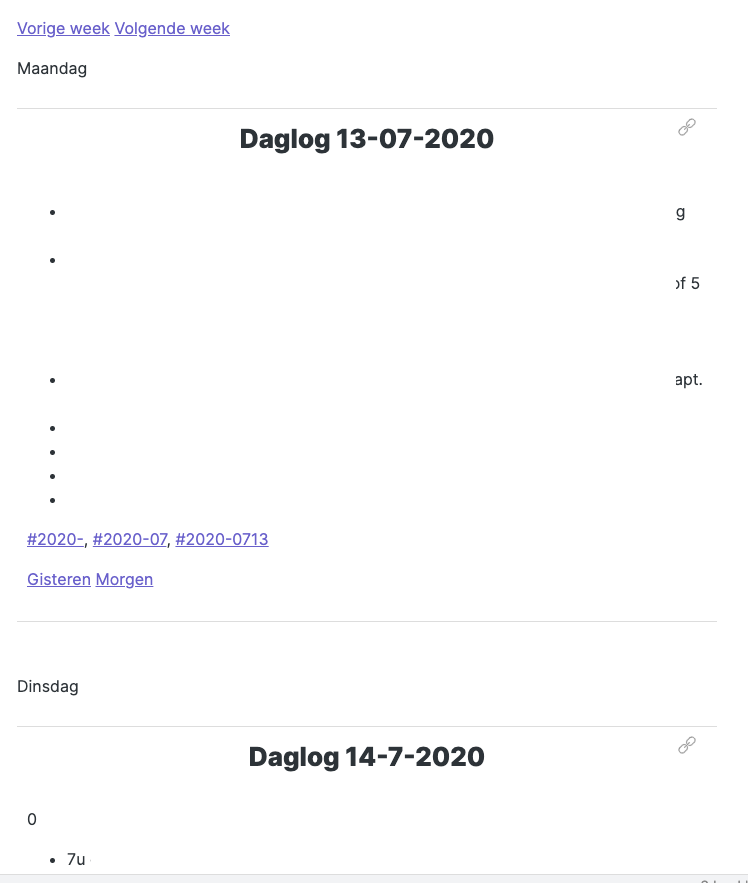
Week logs are notes that collate the day logs of a week. (Since I restarted doing weekly reviews, a week log is accompanied with a note that contains review notes.) Collating is done by transcluding 7 day logs into one note. I add links to the previous and next week on top. I use the week logs in my weekly review on Friday, to write hours in my timesheets at the end of the week, and to write my Week Notes blogpost on Sunday.

A week log is a list of transcluded day logs. Above in edit mode, below in preview mode
Monthmaps are something I make at the start of each month, they are a mindmap of the coming month, hence the name (the Dutch word for month, ‘maand’ sounds a bit like the English mind in mindmap). It’s a habit I started 4 years ago. I list every area (see folder structure above), and within those areas I list every project where I see I might hit a snag, where I have concerns or urgencies are likely to pop up, or where activities are in store I know I usually try to evade or postpone. I add easy actions I can think of that will help me deal with such barriers. It’s a way to confront underlying hesitations or anxieties and prevent negative consequences from them. I refer to it during the week, to see if barriers indeed popped up, or what I had planned to deal with them when they do. I go through it during weekly reviews as well.
In the next part I’ll take a look at how I’ve replaced my todo-list app Things with simple markdown files in Obsidian.
 English