After solving the HTTPS issue I had, and reading once more the Micropub specifications, I succeeded in posting a blogpost to my WordPress site using the Micropub endpoint. This all as part of my quest to build my own Micropub Client.

Having established I could post correctly, I tried out different types of postings I think I will be making this way. Which turned up an oddity:

When the HTML I submit contains the label <svg>, or even <svg the endpoint returns a 403 error. Meaning it understands my request but isn’t allowed to execute it. This seems strange to me. I know that adding image files must be done seperately, but this is an SVG icon description in HTML with a path etc., not a separate file. On the IndieWeb chat channels it was pointed out this might be an issue with WP core, where attempts to sideload certain file types are filtered out, but as far as I can tell that is not what is happening here. Someone else on the IndieWeb chat could not reproduce the error. So perhaps it is something in the way I create my request.

I’ve posted it as an issue on the Micropub github page, including the script I use to create the request to the Micropub Endpoint.

I am writing a PHP script to talk to my website’s Micropub endpoint. When I had first recycled the PHP script I use to write my Booklists, I ran into an error concerning the HTTPS encryption of traffic to my website:

SSL operation failed with code 1. OpenSSL Error messages:
error:14090086:SSL routines:ssl3_get_server_certificate:certificate verify failed

For my booklists I had initially pseudo solved it by approaching my server side script in HTTP, not HTTPS. That is not an option when talking to my WordPress site though.

Jan Boddez helpfully gave a few pointers towards potential solutions. I assumed that the issue was that the webserver stack (MAMP PRO) had no access to the certificates it needed to talk to my website.

I downloaded the Mozilla CA bundle as .pem file, and for good measure also the one for my own website, as described here. I added the contents of the .pem file for my own site to the CA bundle at the end (.pem files are text files and you can paste all .pem files together)

At first I added a line in php.ini (be aware that MAMP has many PHP versions installed, which all have their own php.ini file, so make sure to edit the right one).

curl.cainfo = /path/cacert.pem
openssl.cafile= /path/cacert.pem

The fist one definitely wasn’t going to help, as I’m not using curl to send my webrequest, but added for good measure. The other one didn’t help either.

Then I came across a PHP function that could show me which certificates the script was trying to use:

var_dump(openssl_get_cert_locations());

That told me that MAMP is looking in the folder Applications/MAMP/Library/OpenSSL/certs/ in which the cacert.pem file was an outdated Mozilla CA bundle. I replaced it with the one I had downloaded and had added my own site’s file to.

That worked. My script is now able to talk to my website’s Micropub end point and create a post on my site. However the content of the post is missing, so now the next step is ensuring I am posting to my site in the right format. But the crucial first hurdle is taken: contact!

I’ve started to write a Micropub client. Not a generic one (there are a range of them out there), but one for my personal use case(s) and specific set-up. For instance so that I can prepare a short blogpost within my everyday note taking system, and then post it to my website here.

I’m doing this because I found that my personal use cases don’t fit well with the clients that are out there. I want something that is local first. Something that stays within my workflow, does not require me to switch context or tools (not having to go to my WordPress back-end or a separate app to post e.g.). Positioning blogging as something that isn’t a separate task, where posts get prepared as a regular by-product of my other tasks, just needing me to finish them and hit post.
A personal software tool in short.

The upside compared to more generic existing Micropub clients is, that I know my own specific use cases and set-up. A personal tool does not have to cater for every option of eventuality, just needs to cater to something very specific. That should make it easier to build as a ‘narrow band’ tool, not requiring many ‘what ifs’ to be covered. This because, as I wrote in the linked blogpost, in narrow band tools, my context and preferences are the default inputs, and my tasks are predictable, allowing them to be put together into the equivalent of a function that you pass a few parameters. The result basically is code.

I’m writing it from scratch and now am trying my hand at writing the most minimalistic script that can take some content and post it to my blog, focusing on sending something from my php script to my website through its Micropub endpoint.Using the helpful suggestions of Jan Boddez on where and how to start, reading up on Jamie Tanna’s experience doing the same, and using his tool to manually generate the right authorisation tokens for Micropub (found here).

I’ve hit my first snag to solve, which is that my calls to the Micropub endpoint fail because there’s an issue with the HTTPS encryption (certificate verify failed). Procrastinating on solving that, I’ve written this post, and opened a page here to track progress.

Houtje-touwtje, literally ‘small stick-short rope’, or cord loops fasteners in English, is the more down to earth and old Dutch phrase for putting stuff together with duct tape (known as MacGyver tape to many here, after the 80’s tv series). After messing around in the FreshRSS back-end last weekend, yesterday I made a houtje-touwtje working version to let me post more easily about the things I find in my feed reader.

In my previous post I mentioned I want to support three different reactions:

  • favourites, something I liked, or want to let the author know I appreciated
  • bookmarks, something I (want to) read, and keep reference to for my notes
  • replies, something where I comment on or reply to a posting and its author directly

Four labeled posts in my feed reader

The way I mark postings in my feed reader is attaching a label to them (favourite, bookmark, reply)
Then with the SQL statement from the last posting I pull out those labeled postings (label, url, title, author, and content).

Yesterday evening I attempted to bring it a step or two further, but ended up with something that works.
I created a php html page that shows me, using the SQL query, every labeled posting and for each posting shows a webform. That webform is needed because I want to be able to add two things to every labeled posting (though they’re not mandatory)

  • My motivation for favouriting, or bookmarking, or my reply
  • A quote of the bit in the original posting I am picking up on

The form for me to add motivation and selected quote

Next to that the form is needed to forward the other information (link, title, URL) to the next stage, along with my response and quote. This simultaneously allows me to clean up URLs, shorten the title or provide the actual author name if the post only contains a shortened username e.g.

The webform also contains a field for the total number of labeled items (hidden), and a field for the label itself. Again needed to forward them to the next stage of the process.

The second stage is that submitting the form, calls the same php page again, but this time to process the submitted form information (no longer the database query)

Based on the label (fav, bookmark or reply) it selects a template for how I want to show those in my blog (each have their own svg-icon and first sentence), uses the right microformat, and adds in the url, author, title and my reaction and selected quote in the right spots. The microformat is relevant for when my posting sends a webmention to the website I’m reacting to, and lets that site know if it’s a reply (to show underneath in their comments), or a bookmark or favourite. Assuming that the other website can receive webmentions that is.

Resulting HTML

The result of that is then shown to me in HTML. I paste that HTML into my blog editor, add things like posting categories and tags, and hit publish. In essence I’ve replaced what the Post Kinds plugin, that I stopped using, in my WordPress blog did before: automating fetching some info, and adding it into my posting. It is akin to what I had previously, where I weekly posted links to my blog from my Evernote bookmarks using e-mail.

The posting on the blog

This ‘houtje-touwtje‘ set-up doesn’t do the fancy things yet, like posting itself automatically to my blog through micropub (UPDATE January 2022 it now does!), or providing me this functionality within my FreshRSS reader’s interface. Also, after posting things, I need to manually delete the labels, so they don’t resurface the next time I run the php script.

Another path to explore is using the same or similar workflow to put labeled posts into my personal notes.

This morning I tested out the workflow, and I was pleased with the result. I loaded up the feed reader, and did my usual reading. I marked things for follow up. I ran the script, added my motivation and selected quotes. Pasted the resulting HTML into my blog, added categories and hit publish. This definitely feels smoother and less time consuming. It’s been a while I posted more than 1 thing based on my feedreading that day, let alone four (1, 2, 3, 4) within minutes of reading it. The ‘normal’ routine was ending up with a bunch of open tabs in my browser, and at the end of the day giving up and hitting close-all for those I didn’t get around to during the day.

[Update: the php script is available in my GitHub account]
In reply to a posting by Jan Boddez

These plugins, you create them in WordPress? I’d be interested to see an overview posting of what you’ve created thusfar. To see if it gives me any ideas I can act on with my low coding skills. (Although on the connective tissue of micropub and microsub, I’m likely more interested in the actual code and its workings itself)

Moving more and more of my feed reader’s functionality into separate plugins, which can be (de)activated on the fly. So far, I’ve got…

Jan Boddez

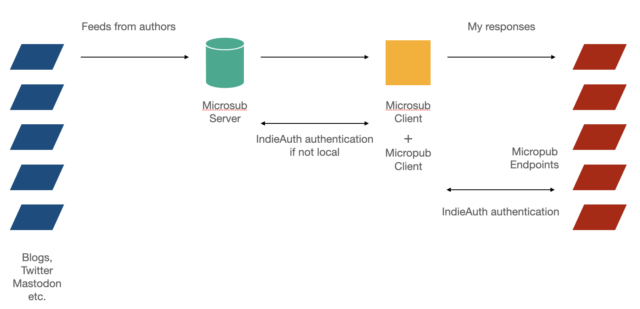
Two years ago I wrote about the features I’d like to see in an ideal feed reader. Today I’ve tried to sketch out the various components, based on the various IndieWeb protocols, and then match the features I listed previously to the component that I think should provide it.

Separating feed reading into IndieWeb components

Feeds from blogs, to the left in the sketch below, end up in a microsub server, whose function is to fetch and store feeds. A microsub client is what presents those fetched feeds to me. A regular feed reader usually does both these things, but splitting them like the IndieWeb does allows multiple clients to use the same collection of feeds and feed items. It allows a wider diversity of readers, if the fetching is dealt with separately.
The microsub client also contains a micropub client. This allows having action buttons underneath each item presented in your microsub client. Hitting a button posts your reply or remarks, or shares something to your own website, and through your site to e.g. Twitter or Mastodon. Ideally it would be possible to have different websites to share to, next to storing locally in a specified format. The website that receives such an action has a micropub endpoint, and may need authentication through IndieAuth.

Such a reader set-up should be able to run locally on my laptop, as well as on a basic hosting package, so likely php / mysql based. Locally because I want to run my stuff local first, but the same thing online, even if a home server, because I’m not always working on my laptop and would like access from my tablet too, and point my Android Indigenous app to my subscriptions. Locally I would not need authentication from the microsub client to the microsub server, but in all other situations I would.

The sketch above is completely congruent with how I sketched my information gathering and filtering process in 2005:

filter1.jpg

Matching the ideal functionality to IndieWeb components

When I match the features of my ideal feed reader to those various IndieWeb components I think this is what results:

Microsub server needs to be able to :
* use various kinds of feeds (rss, atom, json, h-feed)
* allow folders (so I can arrange feeds on social distance)
* recognize and store tags if feed items have them
* allow me to tag _feeds_, really meaning tagging authors
* keep track of posting frequency, last post seen of feeds
* keep track of tags or predefined topics mentions/frequency
* pull in machine translations by default for certain feeds and store them with the orginal item

Microsub client needs to be able to:
* present the feed items in the server’s folder structure as a long list (the classic feed reader view)
* present views based on patterns in current feed items: what’s hot, what’s unique? Also set against social distance. (Topics discussed in my communities today)
* present views based on feed tags (show me all Germany based blog items of this morning, show me every feed of from EU based coders)
* present views based on feed tags and item tags: show me Germany based blog items talking about topic X.
* show full text search results of all items mentioning a certain topic.
* store full text search queries
* present visually which topics seem to be hot in which community, or where the frequency of mentioning a topic has changed
* provide a search of feeds (not feeds content): do I already have this feed in my list, where’s the feed of author Y?
* pull in a machine translation on request

Micropub client needs to be embedded in the microsub client and should support:
* saving an article as markdown or as html, to disk, to Zotero
* creating a todo from it by amending a textfile,
* bookmarking it, either to my blog or some other target
* sharing something about it to my blog, to Mastodon through my blog
* replying to it, through my blog to Mastodon, Twitter, other blogs
* allow configuring new actions.
* choosing from multiple micropub endpoints

What do you think, should some of these features be provided by other components than they’re currently listed? Are features missing that you’d like to see in your ideal feed reader?