Y is currently learning European countries and their capitals for school. Of the 45 country/capital combinations to be learned on a blind map, 24 will be tested next week, and the remaining 21 two weeks later. Self study, or with our help, can mean that less well remembered combinations don’t get the attention they need. And where we help she only provides answers and does not see the writing of a name.
Y also likes to practice more than what we can give her in time.
This morning I thought that this was a good option to create a card deck for spaced repetition for her, and install Anki on her (Linux) laptop.
Anki’s data structure is not hard, and the material in this case has an even easier structure (numbers as map reference, country names and city names).
The blind map however was a bit harder to include usefully. The map is not very large, with small numbering. On top of which came that the teacher had made three mistakes numbering some of the Balkan countries. Two were corrected with pen by Y, one was uncorrected. Scanning the map also gave a not very satisfying result in terms of contrast, and there was a folding line through the map as well.
 The scan of the map, with manual corrections
My graphical skills are non-existent, so I started up Claude to improve the image in terms of contrast and legibility. It did, after which I went through the map to verify no mistakes were introduced.
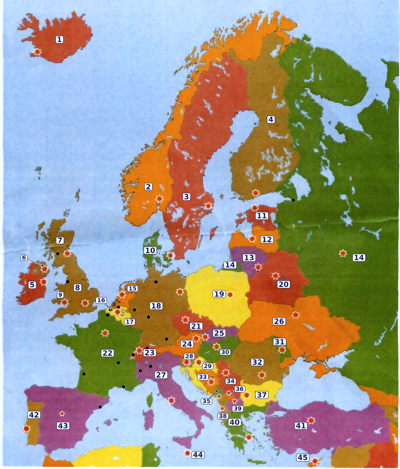
The map with improved contrast and the numbers all replaced in black lettering in a white box.
With the map improved I used it in the template for the Anki cards. I made a note type ‘Europe map’ with the three fields I mentioned, and imported the list of 45 countries into it. I also made an additional note type, namely for groupings of countries. Just a few for now. Creating chunks like that (the Baltics, the BeNeLux, Scandinavia, UK, the Irish island) is another way to make memorising easier. Chunking was not part of how the material was handed to Y, but something I added. Especially chunking the three Baltic countries is useful to tell them apart. They are positioned north to south in alphabetical order.
I created three card types for each country and capital.
- Which country is number X on the map, and what is its capital? (and the grouped version ‘Which countries are the numbers X,Y,Z on the map?)
- What is the capital of [country]?
- [capital] is the capital of which country?
All three card types show the map image as well.
Getting Anki properly installed on Y’s Linux Mint laptop was the biggest hurdle it turned out. The package manager on Linux Mint is tied to outdated versions of Anki, so I had to install it through the terminal after first manually installing a range of additionally needed libraries. The Anki documentation helped. It shows once more how Linux is not a consumer ready OS (mostly because of the variety of Linux distributions, no way any app builder can easily deliver one-click installers for all of them.)
When I picked up Y from school this afternoon, I explained what I made as we cycled home.
She immediately tried it out. In the next few days we’ll see how it works for her.
 English